
Here’s how to use custom variables in CSS.
Step 1: Define your variables at the root level.
:root {
    --PhilMagenta:  #7E2452;
}
Here’s how to use custom variables in CSS.
Step 1: Define your variables at the root level.
:root {
--PhilMagenta: #7E2452;
}
I had an issue after inserting a script for the Google Tag Manager into <head> the section of my online docs.
Everything worked fine when the docs where online. But, whenever I opened one of the pages locally on my computer, it would load the main frame and then pause for about 20 seconds before loading the TOC.
The solution was to add some code to the script to determine if it is online (HTTP) or running from a local file.
One of the toughest parts about formatting text in Flare is dealing with code blocks… until now. Use this process to insert formatted code. It preserves all the spaces and line breaks.
For Each objBookmark In ActiveDocument.Bookmarks
objBookmark.Delete
Next
End Sub
Design -> Themes -> (click drop down arrow at end of themes) -> Browse for themes…
MadCap has a blog post about adding a copy button to code blocks in Flare, found here.
Here’s what I had to do to get it working:
Step 1: Download the clipboard JavaScript and put it in your Resources/Scripts folder:
https://github.com/zenorocha/clipboard.js/archive/master.zip
I recently tested the Mad Quality Plugin for Flare, which is a rule-checking application that uses various rule sets to check your text (kind of like the grammar checker in Word). The tool is a useful plug-in for Flare. Maybe I’ll review it in another post.
One of the sample rule sets checks for British English (see the list below). Now, I really like finding all the differences between British and American English. I know what trainers are and sometimes I wear a jumper. But, I have no idea what some of the ones in this list mean.
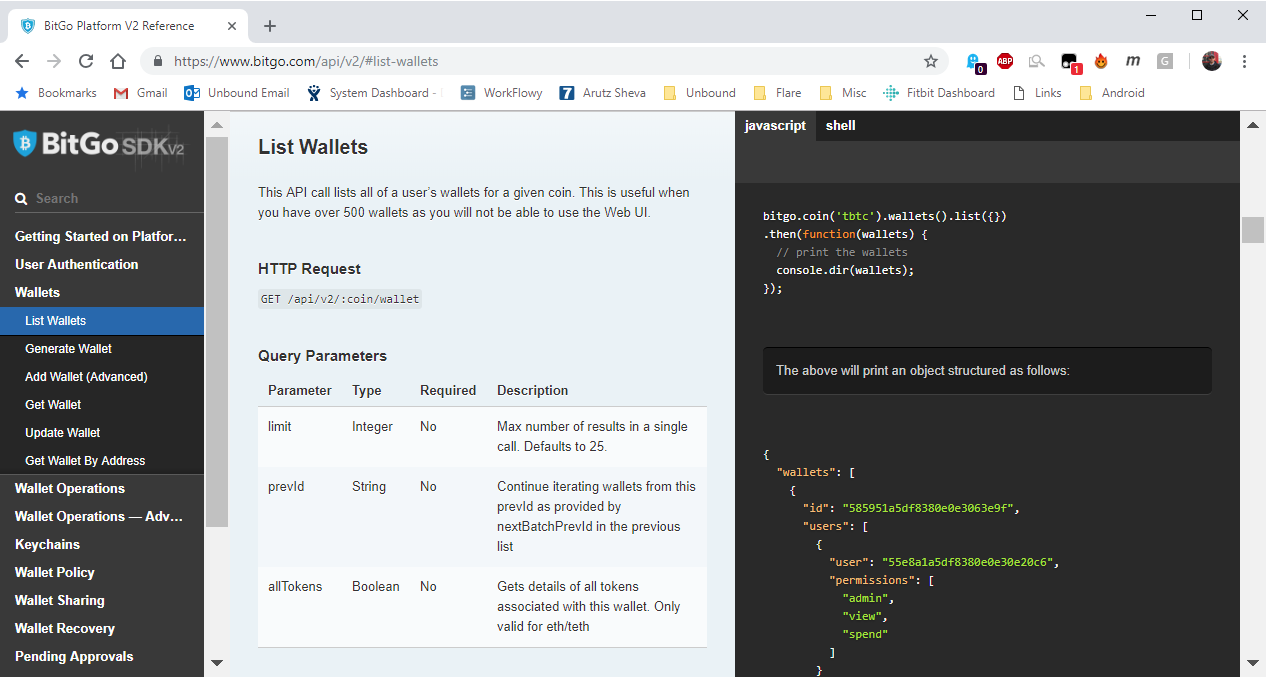
Anyone who is documenting or using APIs has probably come across a new, slick web interface for viewing APIs, like the one in this image:
Use the Word macro code below to set every column in every table to the width of the corresponding column in the reference table.
Continue reading “Word Macro: Set all Columns to the Same Width in Every Table”
If you have large figures, you can create a style that is larger than your normal margins by using a negative left margin. For example:
p.wideImage
{
margin-left: -35pt;
}
[Source: MadCap Forum]
 Phlogtastic