
This is the best hack that I’ve come across in the last several years.
Many times I wanted to count the number of words in a PDF document. The normal way to do this task is to save the file as a Word doc and then open it in MS Word that calculates the count. You can also upload your file to an online site that will count it (although most companies would probably frown upon sending your precious data to some random 3rd party site).
Today I stumbled across an Adobe forum thread that said that Acrobat can run JavaScript. Hmmm… And then I found another site that explains how to create a custom tool in Acrobat. Put these two together and you get a toolbar button in Adobe Acrobat to count the number of words in the doc.
Here’s how to make it work. Note that this is for Acrobat DC.
- Open Acrobat.
- Click Tools.
- Click Action Wizard.
- In the button list under the toolbar, click New Custom Command.
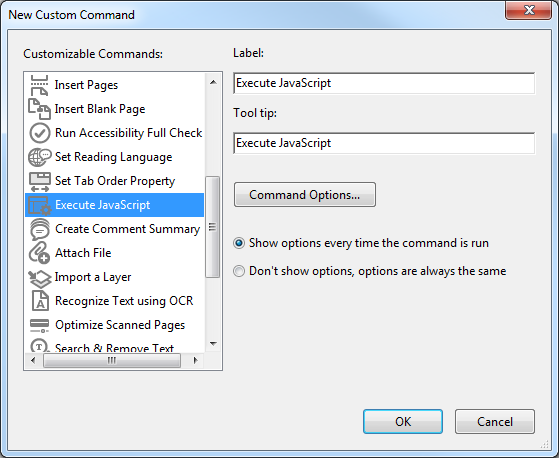
This window opens:
- Click Execute JavaScript.
- Change the Label to something useful, like “Count words in document”.
- Change the Tool tip to something useful, like “Counts the number of words in the current document”.
- Click Command Options…
- Paste in the following code:
/* Count number of words in document */
var cnt = 0;
for (var p = 0; p < this.numPages; p++) cnt += getPageNumWords(p);
app.alert("There are " + cnt + " words in this file."); - Click OK.
- Click Don’t show options, options are always the same.
- Click OK.
You now have a custom command. All that’s left to do is make the button that calls it.
- Right-click in a blank part of the toolbar.
- Click Customize Quick Tools.
- Expand the Action Wizard section.
- Find your new command and select it.
- Click the Add to Toolbar button on the right side of the window.
- Click Save.
That’s it! You can now open any PDF and just click the button to get a word count.
 Phlogtastic
Not bad, but if you just want a subsection of the document, word really shines. But thanks for trying. Now I have to extract the pages I want to check and then run the counter. Similar hassle.
LikeLike
Word is easily better than Acrobat at counting words. But, the issue that I regularly have is to find out how many words are in a PDF, such as for submitting a document for translation when I don't have any other source (like Word). I can't recall ever having to count words in a section of a doc.I took a quick look and there doesn't seem to be a way to grab a selection using JavaScript in a PDF doc 😦 If you find one, let me know and I'll update the post.
LikeLike
amazing!
LikeLike
Thank you! Works perfectly 🙂 Tommy of Finland
LikeLike
Great blog. All posts have something to learn. Your work is very good and i appreciate you and hopping for some more informative posts.Word Counter
LikeLike
Blogger’s brilliant Efforts are really appreciable keep sharing word count tool
LikeLike
Grammarly Premium Free Trial Grammarly is a well-known online grammar checker tool which allows us to check and fix all grammar, punctuation, and spelling mistakes. Grammarly is offering two different plans; premium and free. You can try Grammarly premium version which will cost you $29.95 per month, but if you don't have that much money, then you can use its free version.
LikeLike